Virtualized Homelab & Local AI Infrastructure
Overview
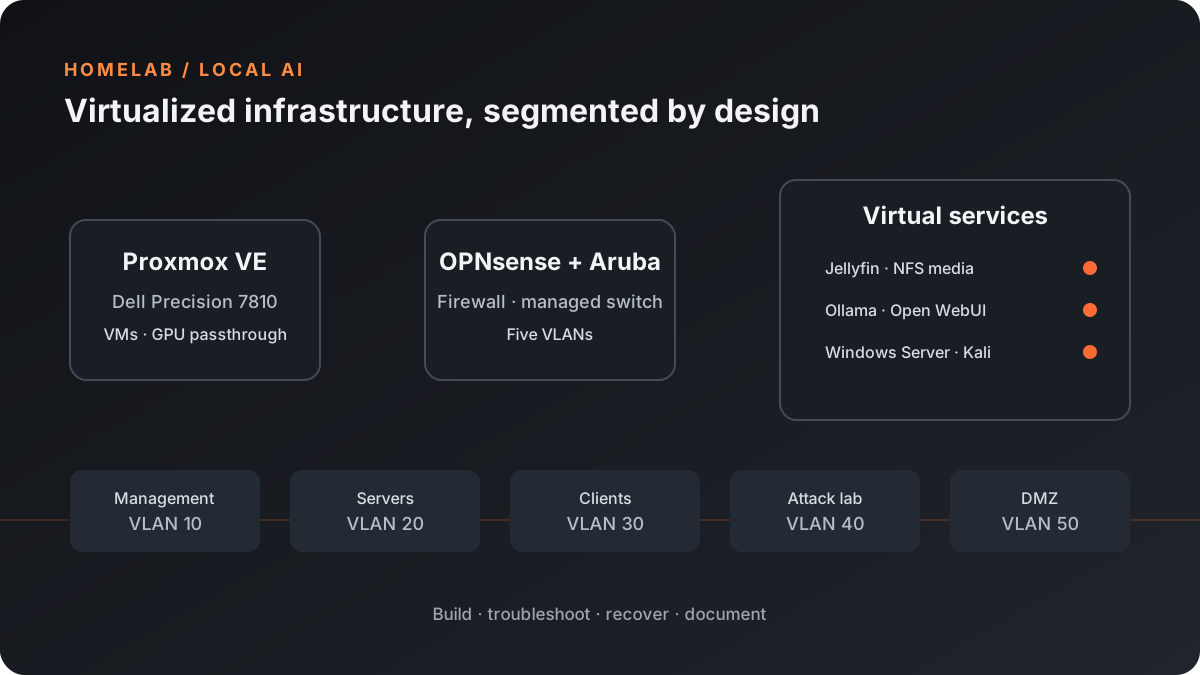
This homelab uses a Dell Precision 7810 workstation as a Proxmox VE host for networked services, security practice, and local AI. OPNsense and an Aruba 2930-series managed switch enforce five VLANs, while a quad-port NIC provides dedicated network interfaces.
The environment combines an Ubuntu Server VM for Docker workloads with separate virtual machines for security and directory-services practice. Hardware and network recovery—including a failing SSD and VLAN-tag issues—became part of the project’s systems-administration work.
- Dell Precision 7810 workstation with 72 logical CPU cores
- NVIDIA GeForce RTX 3060 with 12 GB VRAM for local AI workloads
- Aruba 2930-series managed switch and quad-port NIC
- Proxmox VE hypervisor for VM hosting and resource allocation
Network segmentation
- VLAN 10 — Management: Proxmox and network infrastructure management interfaces.
- VLAN 20 — Servers: Windows Server and Docker-hosting environments.
- VLAN 30 — Clients: Workstations and administrative laptops.
- VLAN 40 — Attack Lab: Isolated Kali Linux environment for authorized security exercises.
- VLAN 50 — DMZ: Separate segment intended for public-facing or externalized services.
OPNsense provides the firewalling and routing between segments. The Aruba switch carries the configured VLANs, and Proxmox virtual interfaces use tags to attach VMs to their intended networks. Inter-VLAN access is controlled rather than treated as a flat trusted LAN.
Virtual machines and services
Ubuntu Server: media and local AI
- Jellyfin: Docker-managed media service using an NFS share mounted at
/mnt/proxmox-mediaand persistent application volumes. - Ollama: Local model runtime using RTX 3060 GPU passthrough for Qwen 2.5 7B and 7B-Coder models.
- Open WebUI: Browser-based interface for interacting with the local model service.
- Tailscale: Encrypted remote connectivity without exposing the homelab’s service ports directly to the public internet.
Security and directory-services lab
- Kali Linux VM: Located in the isolated attack-lab segment for controlled penetration testing and network-auditing exercises.
- Windows Server VM: Provisioned as the foundation for an Active Directory lab. Domain-controller promotion, DNS/DHCP configuration, and Group Policy remain planned setup work.
Recovery and troubleshooting
Restoring management access after VLAN changes
During VLAN setup, the host became unreachable from Wi-Fi clients on a 192.x.50.x subnet while Proxmox management was on the 192.x.10.x subnet. A laptop connected over Ethernet with a temporary static address on the management network provided an alternate access path to correct the configuration.
The display also required a hardware workaround: the RTX 3060 did not provide usable local monitor output during the incident, so a Quadro K4200 was installed temporarily to regain console video.
Replacing a failing SSD and rebuilding the host
Intermittent crashes on the locally purchased workstation led to SSD testing, which confirmed a failing drive. After replacing the SSD, Proxmox was reflashed and the saved VM backups were restored.
VM restore did not resolve every network issue. Some VLAN tag settings in the Proxmox configuration needed to be updated separately before VM networking worked as expected. This highlighted the difference between recovering guest workloads and restoring the host’s virtual networking configuration.
Current scope and next steps
The core platform includes the Proxmox host, firewall and switching, VLAN segments, media and local AI services, and virtual machines for lab use. The Windows Server environment is provisioned but still needs its planned Active Directory, DNS/DHCP, and Group Policy configuration.
Ongoing work includes verifying the segmentation boundaries, refining access policies, and continuing the Windows Server lab. The build is a practical environment for developing skills in virtualization, networking, Linux and Windows administration, storage recovery, and GPU-backed AI.
Related write-up
For the build story and troubleshooting details, read Building a Segmented Homelab for Virtualization and Local AI.